
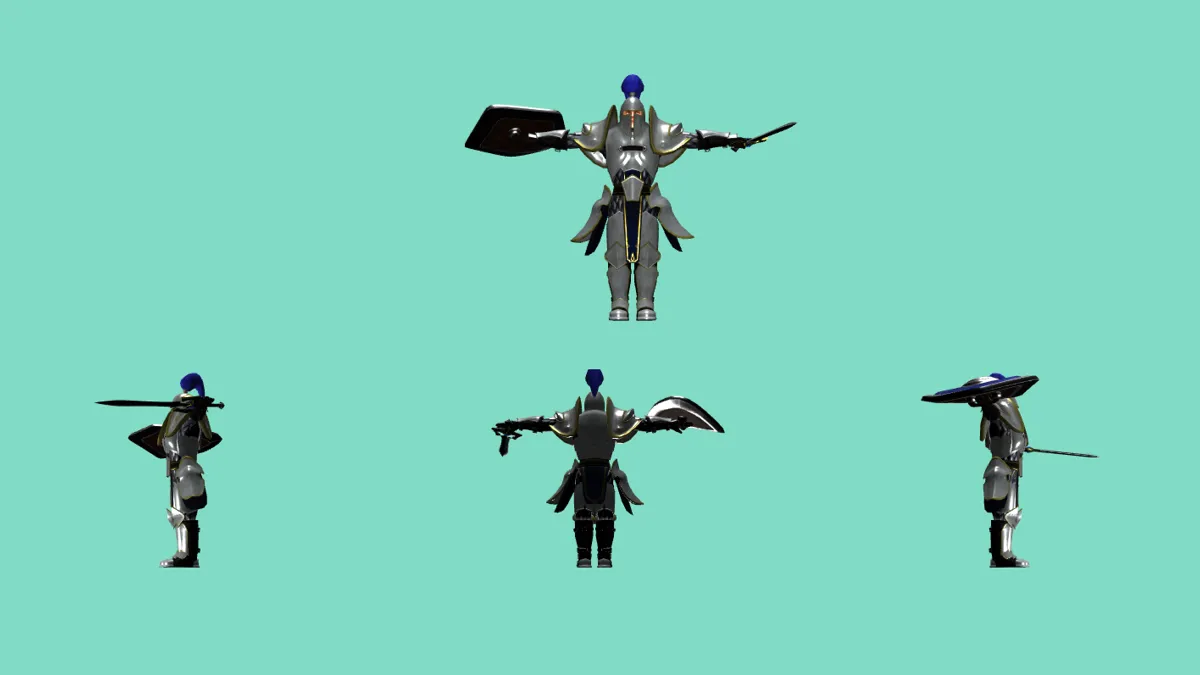
Array of cameras
An advance technique using ArrayCamera with a model animation

models
This experiment demonstrates the advanced ArrayCamera technique in Three.js, providing multiple simultaneous views of a 3D scene through different camera perspectives. This approach is commonly used in security systems, architectural visualization, and game development for split-screen effects.
What You'll See
The scene features a rigged 3D knight model viewed from four different camera angles simultaneously:
- Left Bottom Viewport: Side perspective showing the model's profile
- Center Bottom Viewport: Front-facing view with detailed character features
- Right Bottom Viewport: Opposite side angle for complete spatial understanding
- Center Top Viewport: Strategic overview perspective
Technical Implementation
This experiment showcases several advanced TresJS and Three.js concepts:
- ArrayCamera Setup: Creates multiple PerspectiveCamera instances with different viewports
- Responsive Design: Cameras automatically adjust to window size changes using
useWindowSize - GLTF Model Loading: Loads a rigged knight model with animations using
useGLTF - Animation System: Implements idle animation using
useAnimationscomposable - Viewport Management: Each camera renders to a specific screen region defined by Vector4 coordinates
Key Features
- Performance Optimized: Single render pass for multiple viewpoints
- Responsive Layout: Viewports automatically resize with window dimensions
- Animated Character: Rigged model with idle animation loop
- Professional Lighting: Multiple light sources for optimal model visibility
- Grid Reference: Helper grid for spatial orientation
This technique is particularly valuable for applications requiring multiple simultaneous perspectives, such as security monitoring interfaces, architectural walkthroughs, or multiplayer game implementations.