
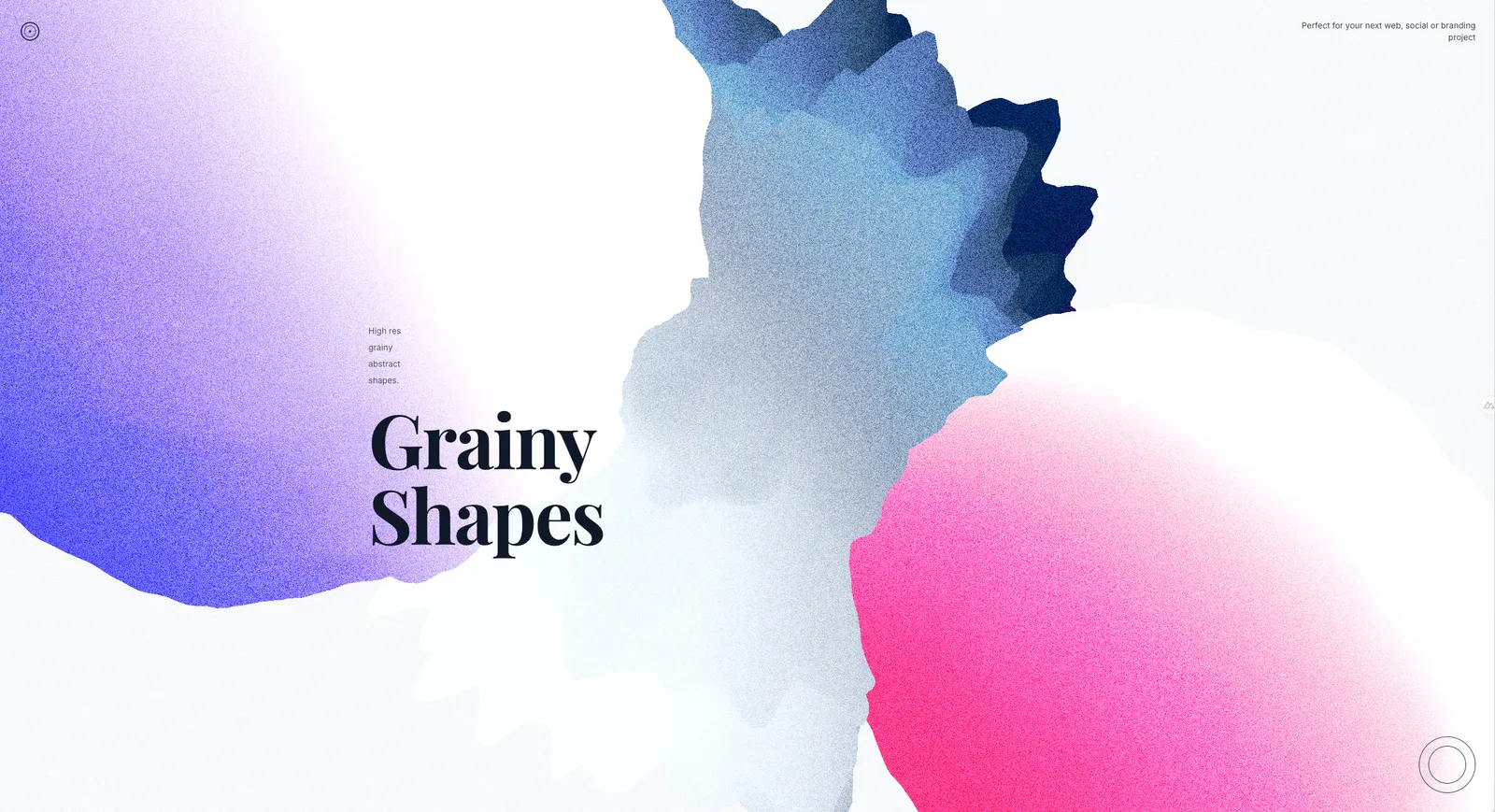
Grainy Liquid Blobs
Animated liquid blobs with GLSL shaders, noise effects, and organic deformation inspired by oil drops in water

A dynamic website design featuring animated liquid blobs created with custom GLSL shaders, demonstrating organic deformation and fluid-like behavior.
Technical Implementation
Architecture Overview
The experiment consists of several key components working together to create the liquid blob effect:
app/components/grainy-liquid/
├── index.global.vue         # Main entry point
├── WebsiteLayout.vue        # Full website layout with text overlay
├── Experience.vue           # 3D scene setup
├── MultiBlob.vue           # Multiple blob instances
├── Blob.vue                # Individual blob component
└── shaders/
    ├── vertex.glsl         # Vertex displacement shader
    ├── fragment.glsl       # Color and surface effects
    ├── vertex.glsl.d.ts    # TypeScript declarations
    └── fragment.glsl.d.ts
Shader System
Vertex Shader (Displacement)
The vertex shader creates organic liquid-like deformation using layered Simplex noise:
// Multiple noise layers for complex deformation
float noise1 = snoise(pos * u_frequency + time * 0.5);
float noise2 = snoise(pos * u_frequency * 2.0 + time * 0.3);
float noise3 = snoise(pos * u_frequency * 4.0 + time * 0.7);

// Combine with different amplitudes for organic movement
float displacement = noise1 * 0.6 + noise2 * 0.3 + noise3 * 0.1;
vec3 displacedPosition = pos + normal * displacement * u_amplitude;
Key Features:
- Simplex noise implementation for smooth, organic deformation
- Multi-layered noise with different frequencies and speeds
- Normal-based displacement to maintain blob volume
- Time-based animation for continuous fluid movement
Fragment Shader (Surface Effects)
The fragment shader handles color mixing, surface effects, and visual texture:
// Fresnel effect for liquid-like rim lighting
float fresnel = 1.0 - dot(normal, viewDirection);
fresnel = pow(fresnel, u_fresnelPower);

// Flowing color mixing with noise
vec2 flowUv = v_uv + u_time * 0.1;
float colorNoise = fbm(flowUv * u_noiseScale);
vec3 baseColor = mix(u_colorA, u_colorB, colorNoise);
vec3 finalColor = mix(baseColor, u_colorC, fresnel);

// Grain texture for surface detail
float grain = random(v_uv * 100.0 + u_time * 0.02) * u_grainIntensity;
finalColor += vec3(grain);
Key Features:
- Fresnel effect for realistic edge lighting
- Fractal Brownian Motion (FBM) for organic color patterns
- Multi-layer grain for surface texture
- Flowing color animation synchronized with deformation
- Iridescent highlights for liquid shimmer
Component Architecture
Blob Component (Blob.vue)
Individual blob with customizable properties:
interface Props {
  colorA?: string     // Primary color
  colorB?: string     // Secondary color
  colorC?: string     // Highlight color
  speed?: number      // Animation speed
  amplitude?: number  // Deformation intensity
}
Features:
- Interactive controls via
useControls()for real-time adjustment - Prop-based customization for different blob variations
- Shader uniform management with reactive updates
- Animation loop using
useLoop()composable
MultiBlob Component (MultiBlob.vue)
Manages multiple blob instances with varied configurations:
const blobs: BlobConfig[] = [
  {
    position: [-4, 2, 0],
    scale: [1.8, 1.8, 1.8],
    colorA: '#6366f1',  // Purple blob
    colorB: '#8b5cf6',
    colorC: '#ddd6fe',
    speed: 0.6,
    amplitude: 0.15
  },
  // Pink and gray blobs with different properties...
]
Features:
- Varied positioning for layered composition
- Different scales to create depth
- Unique color palettes per blob
- Staggered animation speeds for organic movement
Website Layout (WebsiteLayout.vue)
Complete website design with 3D background and text overlay:
<template>
  <div class="relative h-screen w-full overflow-hidden bg-gray-50">
    <!-- 3D Canvas Background -->
    <div class="absolute inset-0">
      <TresCanvas window-size clear-color="#f8fafc">
        <Experience />
      </TresCanvas>
    </div>

    <!-- Content Overlay -->
    <div class="relative z-10 h-full flex flex-col">
      <!-- Header, main content, decorative elements -->
    </div>
  </div>
</template>
Features:
- Layered design with 3D background and HTML overlay
- Responsive typography using TailwindCSS
- Google Fonts integration (Playfair Display serif)
- Interactive controls disabled for presentation mode
Technical Highlights
Noise-Based Animation
The liquid effect relies on sophisticated noise techniques:
- Simplex noise for smooth, organic deformation patterns
- Multiple octaves combined for complex surface detail
- Time-based offsets creating flowing animation
- Frequency variation for different scales of movement
Color System
Realistic liquid color mixing:
- Fresnel-based rim lighting mimicking surface tension
- Flowing color patterns using FBM noise
- Multi-color blending for realistic liquid appearance
- Grain texture overlay for surface detail
Performance Optimization
- Efficient shader implementation with clamped displacement
- Instanced blob rendering for multiple objects
- Optimized geometry using icosahedron base mesh
- Controlled animation speeds for smooth performance
Shader Mathematics
The core deformation uses mathematical functions to simulate liquid behavior:
// Simplex noise for organic patterns
float snoise(vec3 v) { /* Implementation */ }

// Fractal Brownian Motion for color variation
float fbm(vec2 st) {
    float value = 0.0;
    float amplitude = 0.5;
    for (int i = 0; i < 5; i++) {
        value += amplitude * noise(st * frequency);
        frequency *= 2.0;
        amplitude *= 0.5;
    }
    return value;
}
Design Inspiration
The visual style draws from modern liquid design trends:
- Organic blob shapes popular in contemporary web design
- Grainy texture effects for tactile visual appeal
- Gradient color schemes with purple/pink palettes
- Minimalist layout focusing on typography and shapes
This experiment demonstrates how GLSL shaders can create sophisticated visual effects in web applications, combining mathematical precision with organic, fluid aesthetics.